
An insurance explainer video helps insurance agents and agencies turn complex policies, coverage options, and insurance concepts into clear, easy-to-understand visual content.
Insurance isn’t always easy to explain. Terms like deductibles, exclusions, accelerated death benefits, and coverage limits can confuse potential customers, especially when they’re hearing about them for the first time.
A well made video can make these concepts easier to follow by combining simple language, narration, illustrations, and real world examples. Instead of repeating the same explanation during every client conversation, insurance professionals can create educational videos that customers can watch whenever they need.
And with an AI video generator for insurance, creating these videos no longer requires a camera crew, expensive production equipment, or advanced editing skills.
In this guide, we’ll show you three ways to create insurance explainer videos with AI using JoggAI: Explainer Video, Animated Presentation, and PPT to Video.
What Is an Insurance Explainer Video?
An insurance explainer video is a short educational video designed to help people understand an insurance product, policy feature, or process.
Unlike traditional insurance advertisements, which primarily promote a company or service, explainer videos focus on answering specific customer questions.
For example, an insurance agent might create a video explaining:
-
What homeowners insurance typically covers.
-
How term life insurance differs from whole life insurance.
-
What living benefits are and when they may apply.
-
How insurance deductibles work.
-
What customers should know before filing a claim.

Why Insurance Agents and Agencies Need Explainer Videos
Simplify Complex Insurance Information
Insurance policies contain technical terms and contractual conditions that can be difficult to communicate through a short email or conversation.
For example, explaining the difference between a deductible and a coverage limit may take several paragraphs of text.
With an insurance explainer video, an agent can display an example claim, illustrate how the deductible applies, and summarize the key takeaway through narration.
This makes the explanation easier to follow without removing important details.
Create Reusable Customer Education Content
Insurance agents often answer similar questions about coverage, eligibility, exclusions, and claims.
Instead of recording a new explanation each time, an agency can create reusable videos for common topics.
These videos can be shared through:
-
Insurance agency websites and landing pages.
-
Customer onboarding emails.
-
Social media channels.
-
Follow-up messages after consultations.
-
Online insurance education resources.
When policy information changes, the agency can review and update its existing content.
Support Insurance Agent Training
Explainer videos aren’t only useful for customers. They can also support internal insurance agent training.
Agencies can turn approved product information, onboarding materials, and sales scripts into training videos.
For example, a new insurance agent could watch a video explaining living benefits, coverage terminology, or common customer questions before discussing those subjects with clients.
This gives agencies a reusable training resource while allowing agents to revisit topics when necessary.
5 Types of Insurance Explainer Videos You Can Create
1. Homeowners Insurance Coverage Videos
Homeowners insurance policies include different types of coverage, deductibles, exclusions, and policy limits that can be difficult for first-time homebuyers to understand.
An explainer video can introduce these concepts through a familiar scenario, such as a family protecting their first home.
Example video topic: What Does Homeowners Insurance Actually Cover?
Recommended format: Explainer Video
Use illustrations to explain dwelling coverage, personal property coverage, personal liability coverage, and loss of use coverage (including additional living expenses).
2. Life Insurance and Living Benefits Videos
Living benefits can be challenging to explain, especially when clients are unfamiliar with accelerated death benefits and the conditions under which they may be available.
An explainer video can illustrate a hypothetical client scenario, explain qualifying conditions, and show how accessing an accelerated death benefit may affect the remaining death benefit.
Example video topic: How Do Living Benefits Work in Life Insurance?
Recommended format: Animated Presentation
Use an AI presenter alongside diagrams to explain accelerated death benefit riders, eligibility requirements, and the general benefit request process.
Clarify that living benefits vary by insurer and policy, and that qualifying conditions and benefit amounts depend on the actual contract.
3. Insurance Claims Process Videos
After an accident or covered loss, policyholders may be unsure how to file a claim, what documentation to provide, or what happens next.
An insurance claims explainer video can walk customers through the general claims process and help them understand what to expect.
Example video topic: How to File a Homeowners Insurance Claim
Recommended format: Explainer Video
Use a step-by-step visual guide to demonstrate how to document property damage, contact the insurance company, submit claim information, and follow up with the claims representative.
Explain that claims procedures, documentation requirements, and coverage determinations vary by insurer and policy.
4. Insurance Agent Training Videos
Insurance agencies need to train new agents on insurance products, policy terminology, sales conversations, and compliance requirements.
AI-generated training videos can help agencies turn approved onboarding materials, product guides, and sales scripts into consistent, reusable learning resources.
Example video topic: How to Explain Coverage Limits and Policy Exclusions to Clients
Recommended format: PPT to Video
Turn existing insurance training presentations into narrated videos with an AI avatar. Agencies can use these videos for new agent onboarding, product knowledge training, and ongoing sales training.
Training content can be updated as insurance products, regulations, or internal processes change.
5. Insurance FAQ Videos
Insurance agents regularly answer questions about deductibles, premiums, coverage limits, policy renewals, and exclusions.
Instead of explaining multiple complex topics in one long video, agencies can create a series of short insurance FAQ videos that address individual customer questions.
Example video topic: What’s the Difference Between a Deductible and a Coverage Limit?
Recommended format: Explainer Video or Animated Presentation
Use simple visuals and realistic examples to clarify insurance terminology. For instance, show how a deductible and policy limit can affect the amount an insurer pays on a covered claim.
These videos can be shared on insurance agency websites, customer education pages, and in follow-up emails after client consultations.
How to Create Insurance Explainer Videos with JoggAI
Method 1: Create a Homeowners Insurance Coverage Explainer Video
Best for: Policyholder education, homeowners coverage reviews, and explaining potential coverage gaps.
Insurance producers often need to explain what a homeowners policy covers—and, just as importantly, what it doesn’t. During a coverage review or renewal conversation, clients may have questions about dwelling limits, replacement cost, deductibles, and exclusions.
JoggAI’s AI Explainer Video Maker can turn these topics into short, visual explanations that agents can share with prospects and existing policyholders.
Step 1: Choose Homeowners Insurance Coverage Explainer Video Style
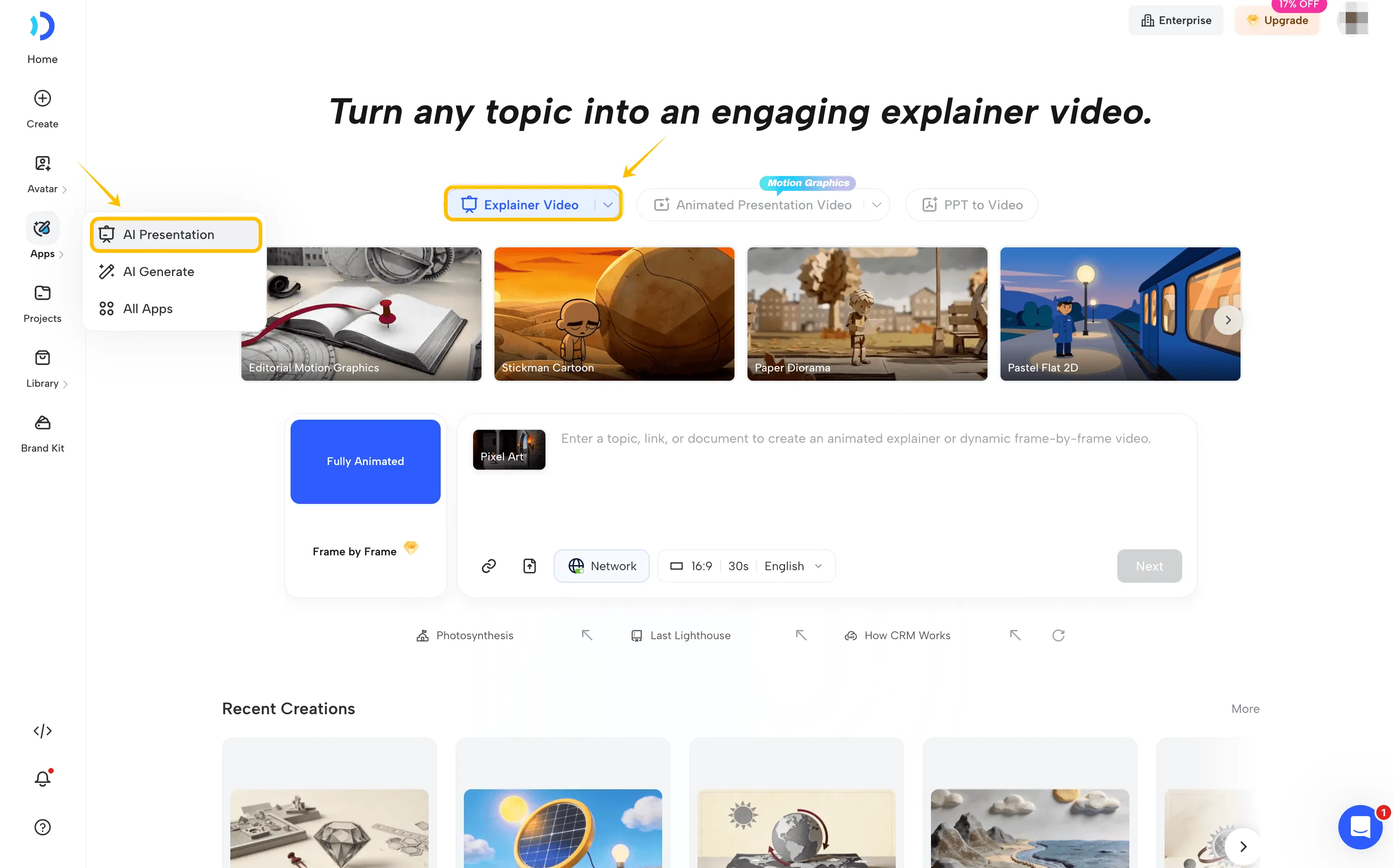
Open JoggAI, navigate to AI Presentation, and select Explainer Video.
Choose a visual style that fits your topic. JoggAI provides two output approaches:
-
Fully Animated: Creates a video using moving visual scenes.
-
Frame by Frame: Builds the video from a sequence of still images.
For a homeowners insurance explanation, you might choose a simple animated style with recognizable homes, personal belongings, and everyday situations. The goal is to make the information understandable rather than visually complicated.
Step 2: Enter Your Insurance Topic or Upload a Script
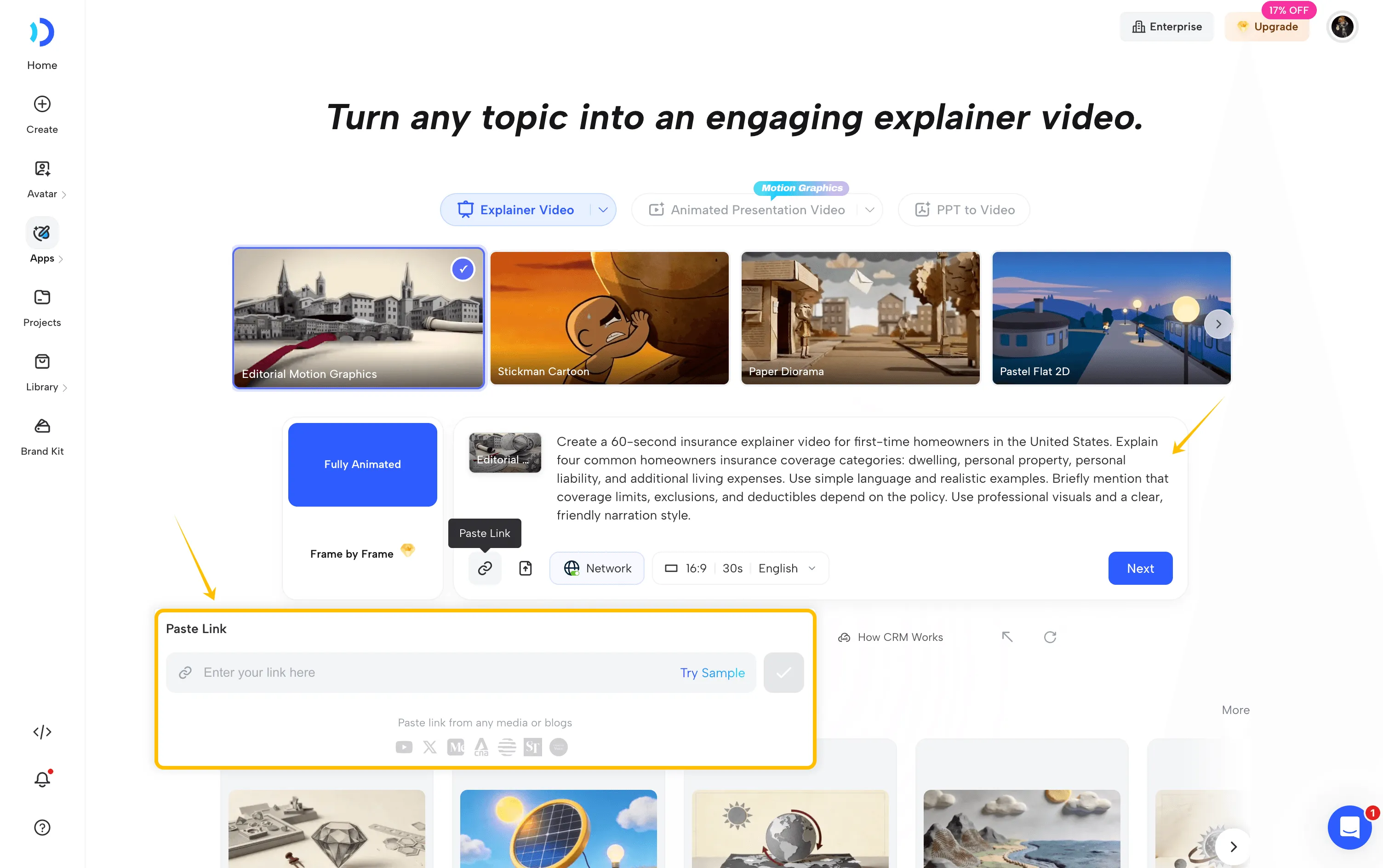
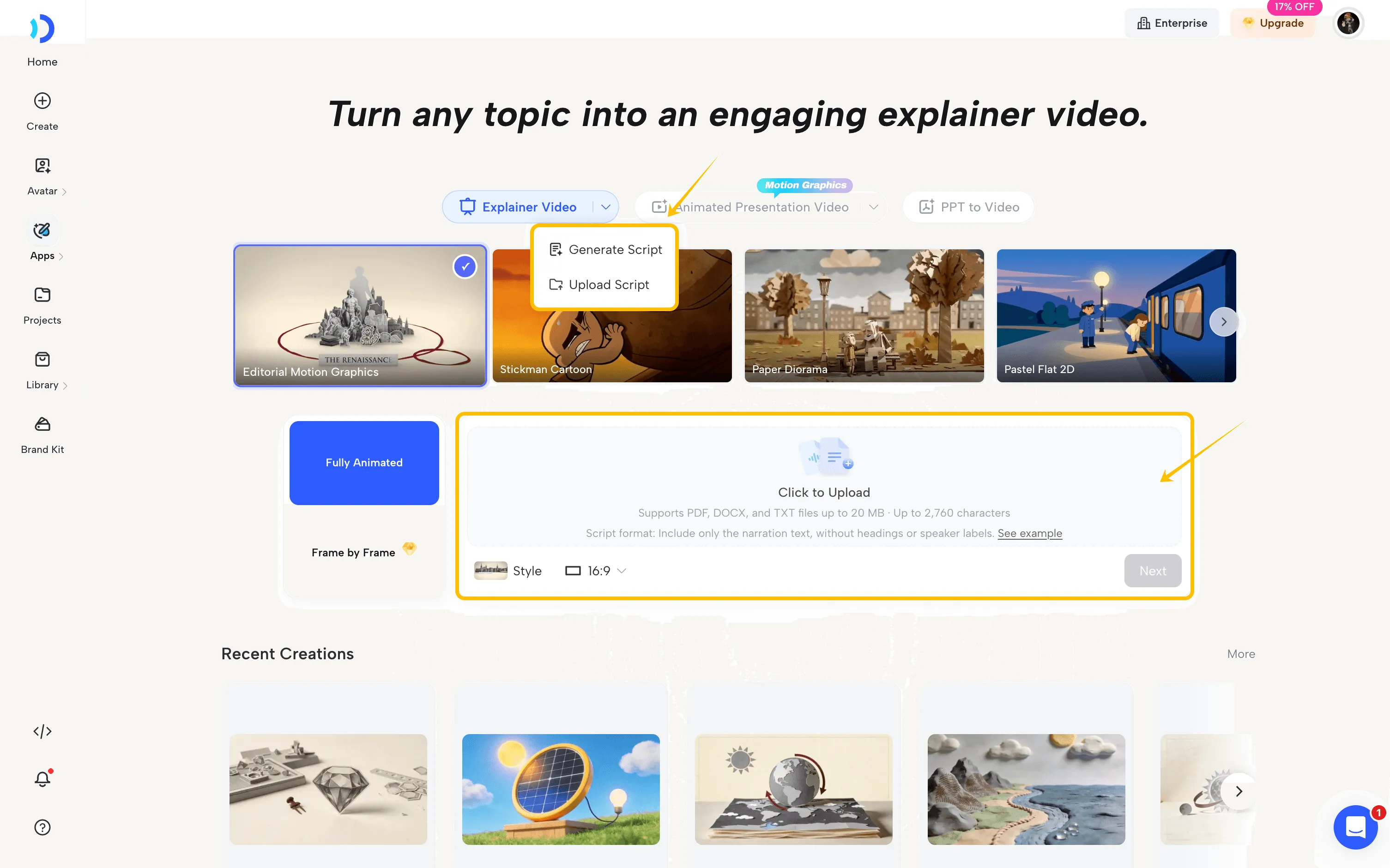
Next, enter the insurance topic you want to explain. You can start with a simple prompt, provide a relevant URL, upload supporting documents, or use your own pre-written script.
For example, try this prompt:
Create a 60-second insurance explainer video for first-time homeowners in the United States. Explain four common homeowners insurance coverage categories: dwelling, personal property, personal liability, and additional living expenses. Use simple language and realistic examples. Briefly mention that coverage limits, exclusions, and deductibles depend on the policy. Use professional visuals and a clear, friendly narration style.
If you already have an approved insurance script, you can use it directly instead of generating a new one. This is especially useful for insurance agencies that need to maintain consistent messaging and comply with internal content guidelines.
Finally, choose your preferred aspect ratio, video duration, and language. For websites or YouTube, 16:9 is a practical starting point, while vertical formats are better suited for short-form social media videos.
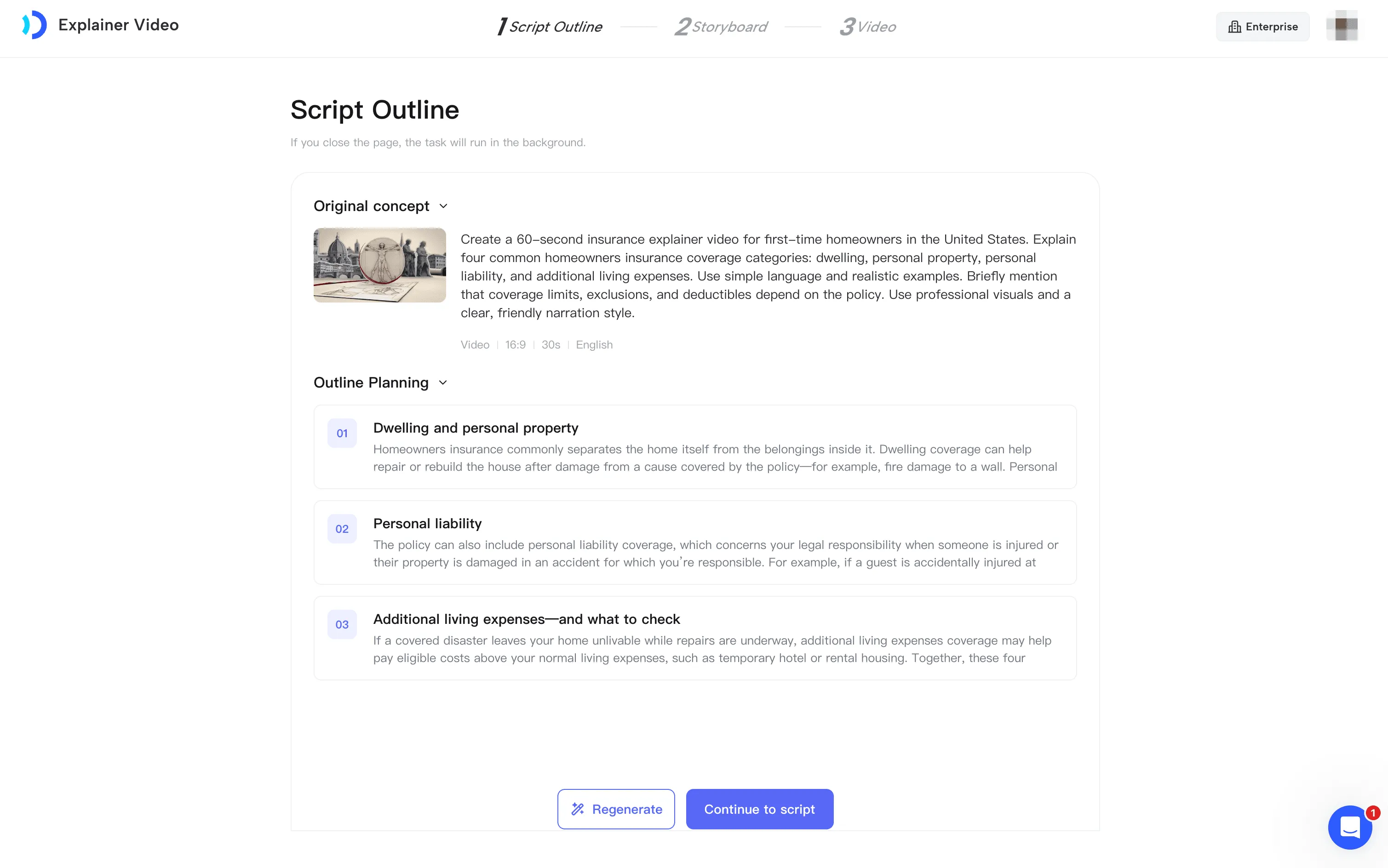
Step 3: Review the Script Outline
JoggAI generates a script outline based on your topic and reference materials.
Before continuing, check that the explanation follows a logical sequence.
For the homeowners insurance example, a useful structure might be:
-
Why homeowners insurance matters.
-
What dwelling coverage generally protects.
-
How personal property and liability coverage work.
-
Why deductibles, limits, and exclusions matter.
If the wording is too technical, you can request changes directly in the prompt field.
For example:
Simplify the explanation for first-time homeowners. Use everyday language and avoid unnecessary insurance jargon. Keep the coverage descriptions accurate.
Review the revised outline before proceeding to the full script.
Step 4: Customize the Storyboard and Visuals
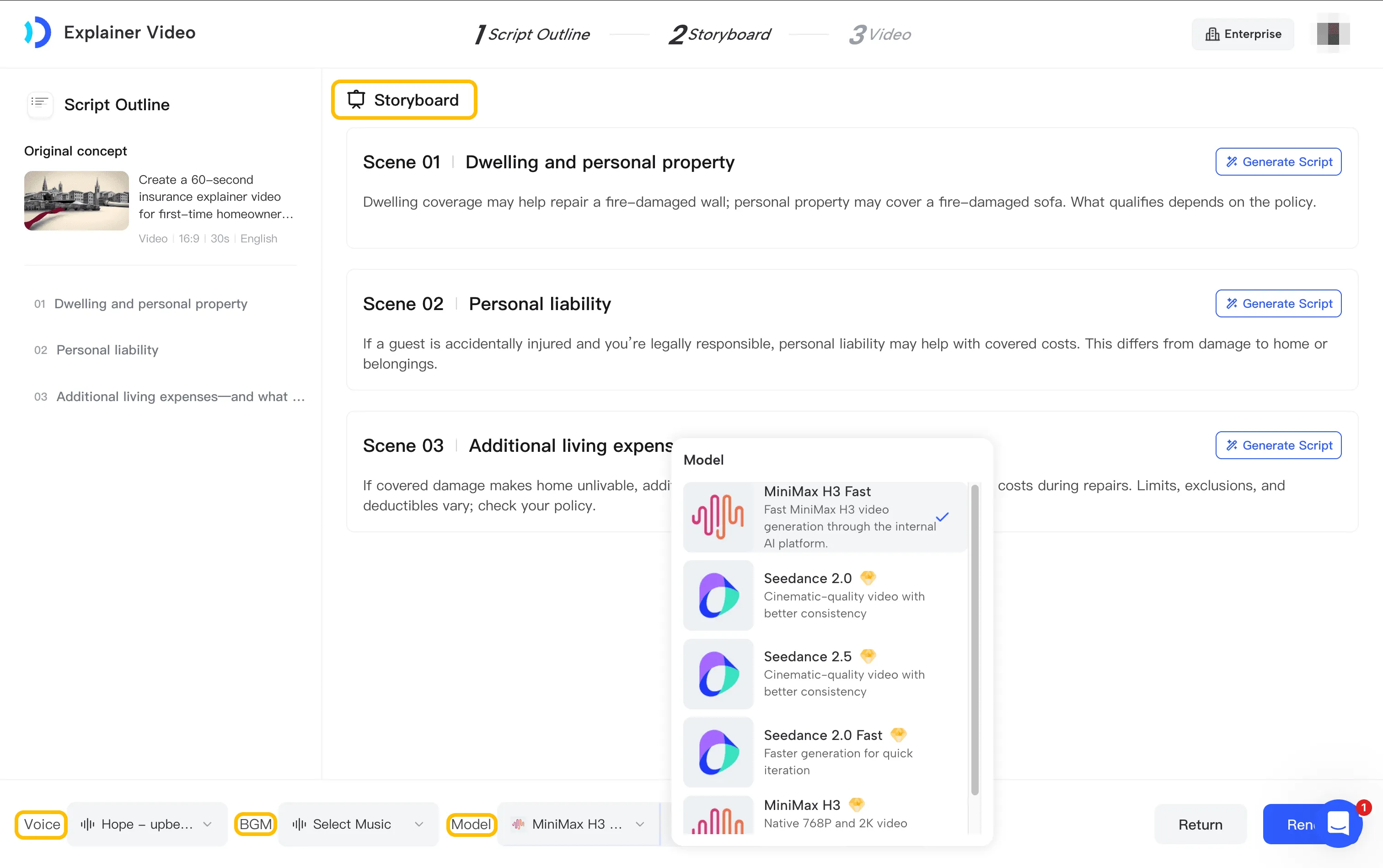
JoggAI creates a storyboard with narration and visual directions for individual scenes.
Review each scene to ensure the visuals support the explanation.
A scene about personal property coverage could show furniture, electronics, and household belongings.
A scene about exclusions could use a simple comparison to distinguish commonly covered risks from risks that may require separate insurance.
You can refine the script, visual descriptions, and scene sequence before rendering.
Choose a narration voice, generation model, and subtitle settings that fit your audience.
Step 5: Generate and Review Your Video
Once the storyboard is ready, render the video.
Watch the finished result carefully. Check whether the narration matches the visuals, whether important terminology is correct, and whether the video communicates policy limitations clearly.
A final human review is especially important for insurance content because coverage and exclusions vary between insurers and individual contracts.
The result is a reusable insurance explainer video that can be shared with customers or published as educational content.
Method 2: Compare Term Life and Whole Life Insurance with Animated Presentation
Best for: Insurance product comparisons, policy education, and visual explanations that benefit from slides and AI presenters.
Some insurance topics require more structure than a short animated story.
For example, comparing term life insurance with whole life insurance may involve coverage duration, premiums, cash value, and other differences.
That’s where an AI animated presentation can be particularly useful.
JoggAI combines presentation slides, AI avatars, B-roll footage, and animated visual elements to explain information step by step.
Let’s create an animated presentation about: Term Life Insurance vs. Whole Life Insurance.
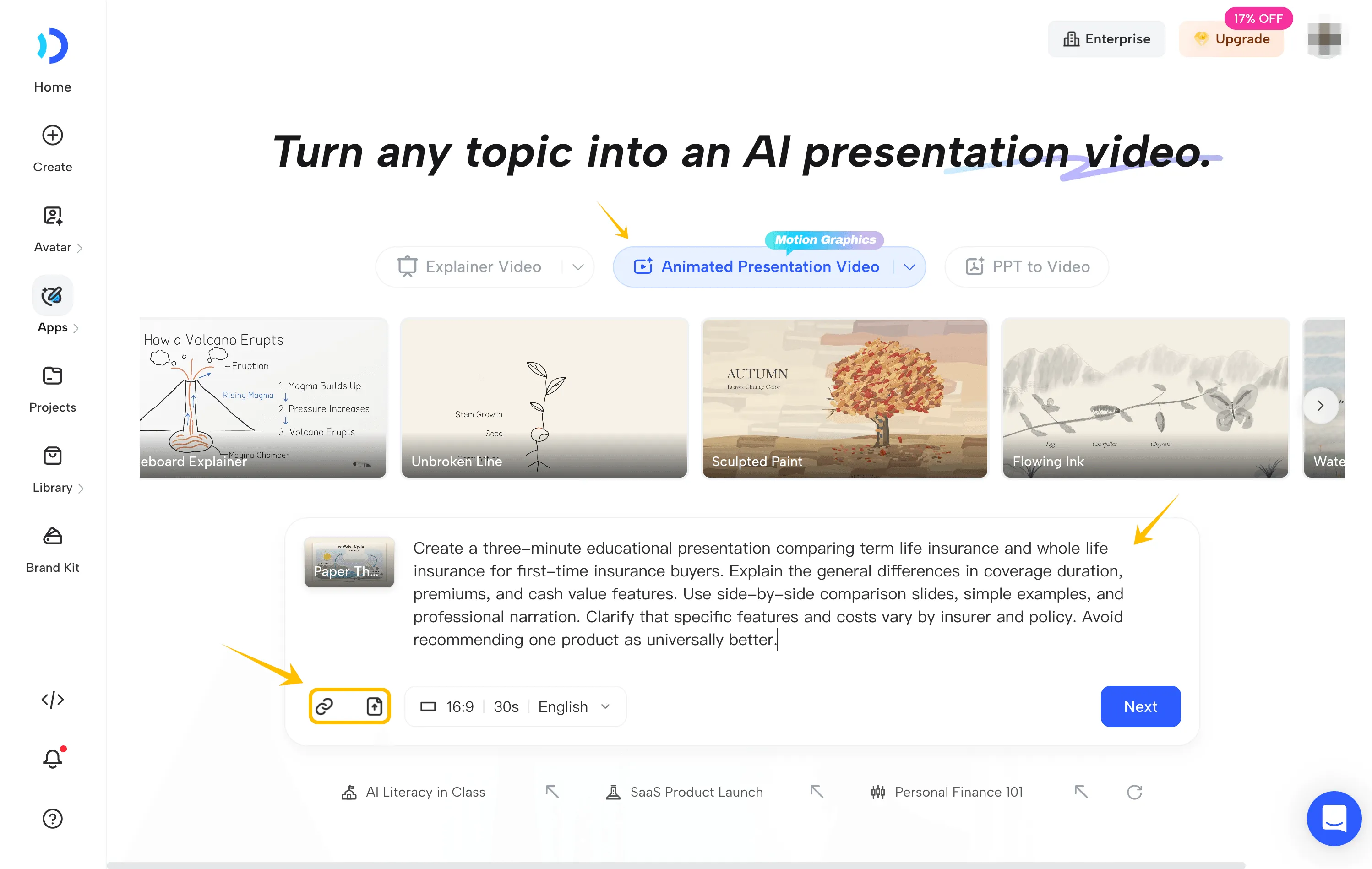
Step 1: Enter Your Topic and Reference Materials
Open JoggAI’s Animated Presentation workflow.
Enter your topic or upload relevant insurance materials, such as educational PDFs, product documents, or approved training content.
You can start with this prompt:
Create a three minutes educational presentation comparing term life insurance and whole life insurance for first time insurance buyers. Explain the general differences in coverage duration, premiums, and cash value features. Use side-by-side comparison slides, simple examples, and professional narration. Clarify that specific features and costs vary by insurer and policy. Avoid recommending one product as universally better.
Choose the video duration, aspect ratio, and language.
Step 2: Review the Outline and Storyboard
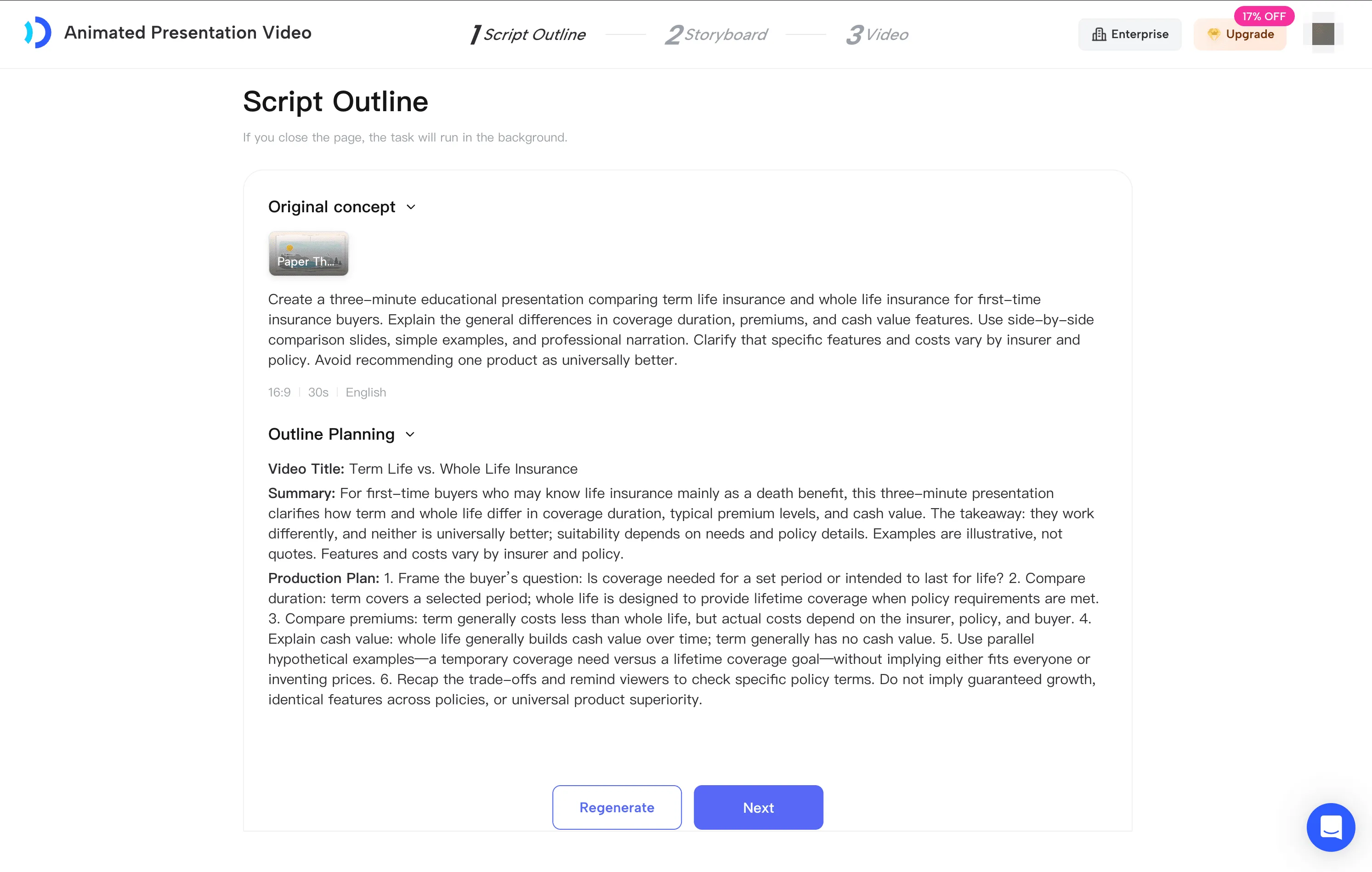
JoggAI organizes the material into a script outline before generating the presentation scenes. Review the information for accuracy and remove statements that oversimplify policy terms.
Once the outline is ready, JoggAI can divide the script into individual presentation scenes.
Step 3: Choose Your Presentation Layouts
One advantage of Animated Presentation is the ability to use different layouts throughout the video.
JoggAI supports scene combinations such as AI Presenter, Presenter + Slides, Presenter + B-roll, and Slides Only.
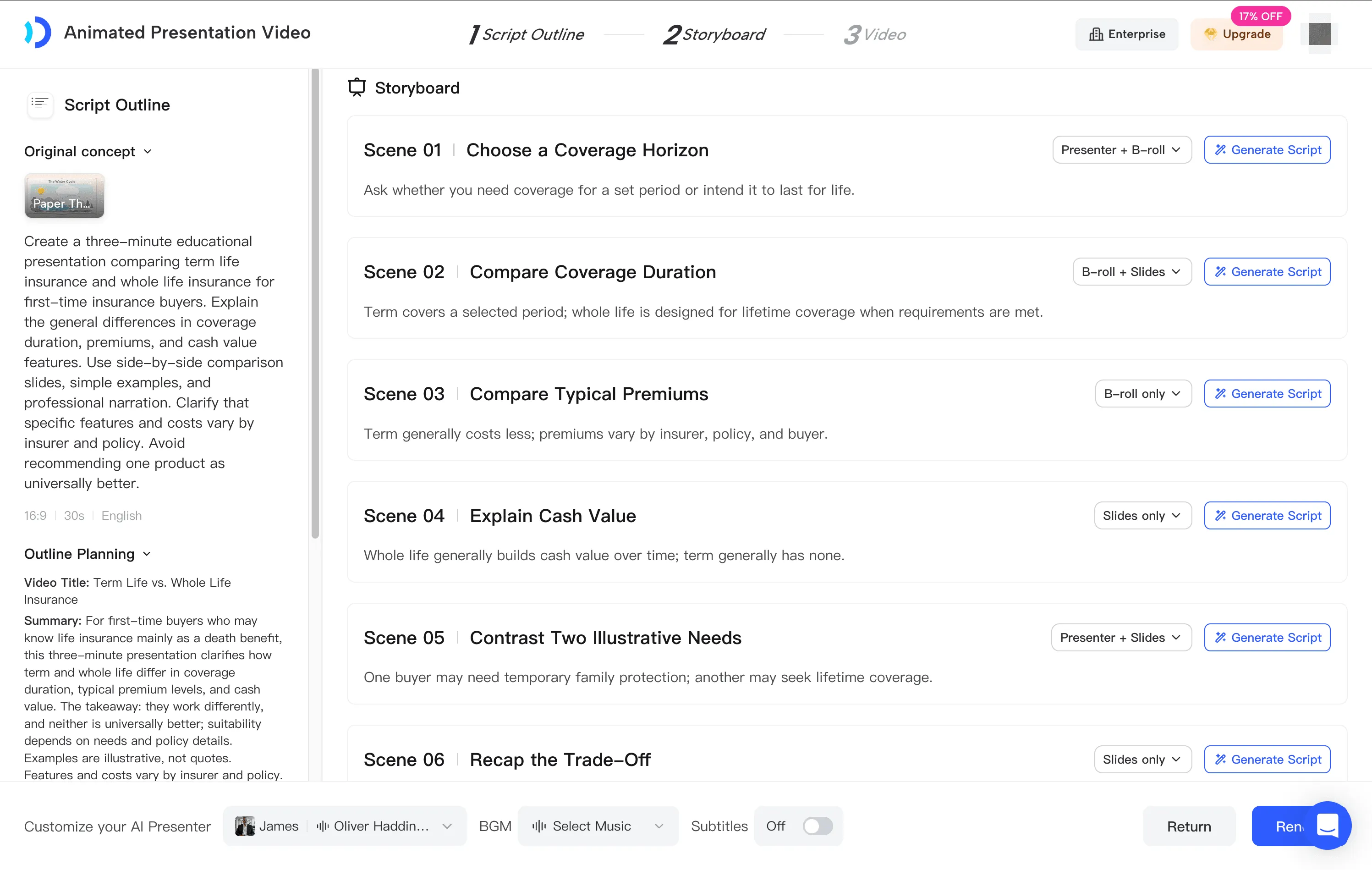
For an insurance comparison, you could use:
| Scene | Suggested Layout |
|---|---|
| Introduction | AI Presenter |
| What Is Term Life Insurance? | Presenter + Slides |
| What Is Whole Life Insurance? | Presenter + B-roll |
| Key Differences | Slides Only |
| Final Summary | Presenter + Slides |
For the comparison scene, create a simple two-column table highlighting general differences in duration, premium structure, and cash value features.
Animated graphics can reveal each point as the narrator explains it.
This helps viewers focus on one concept at a time.
Step 4: Add an AI Presenter and Voice
Choose an AI presenter from JoggAI’s avatar library or use an available custom avatar.
For insurance education, a professional presenter with a clear, conversational delivery can help the presentation feel more approachable.
You can also select a suitable AI voice and adjust the presentation’s visual style.
Step 5: Edit and Export
Once the video has been generated, review the scenes, narration, captions, and visual elements.
After reviewing the final video for policy accuracy, export it for use on your website, educational pages, or customer communication channels.
Method 3: Turn Living Benefits Training Slides into Explainer Videos
Best for: Insurance agent training, product knowledge presentations, and existing onboarding materials.
Many insurance agencies already have PowerPoint presentations explaining their products, sales processes, or internal procedures.
Instead of rebuilding those presentations as videos from scratch, you can use JoggAI’s PPT to Video Converter to turn existing slides into narrated content.
Let’s use an insurance training presentation titled: How to Explain Living Benefits to Clients.
Step 1: Prepare Your Insurance Training Presentation
Start with an existing PowerPoint deck containing approved information.
For a living benefits training session, the presentation might include:
-
What living benefits are.
-
Types of qualifying conditions.
-
Eligibility requirements.
-
How accelerated benefits may affect remaining coverage.
-
Common customer questions.
-
Important disclosures.
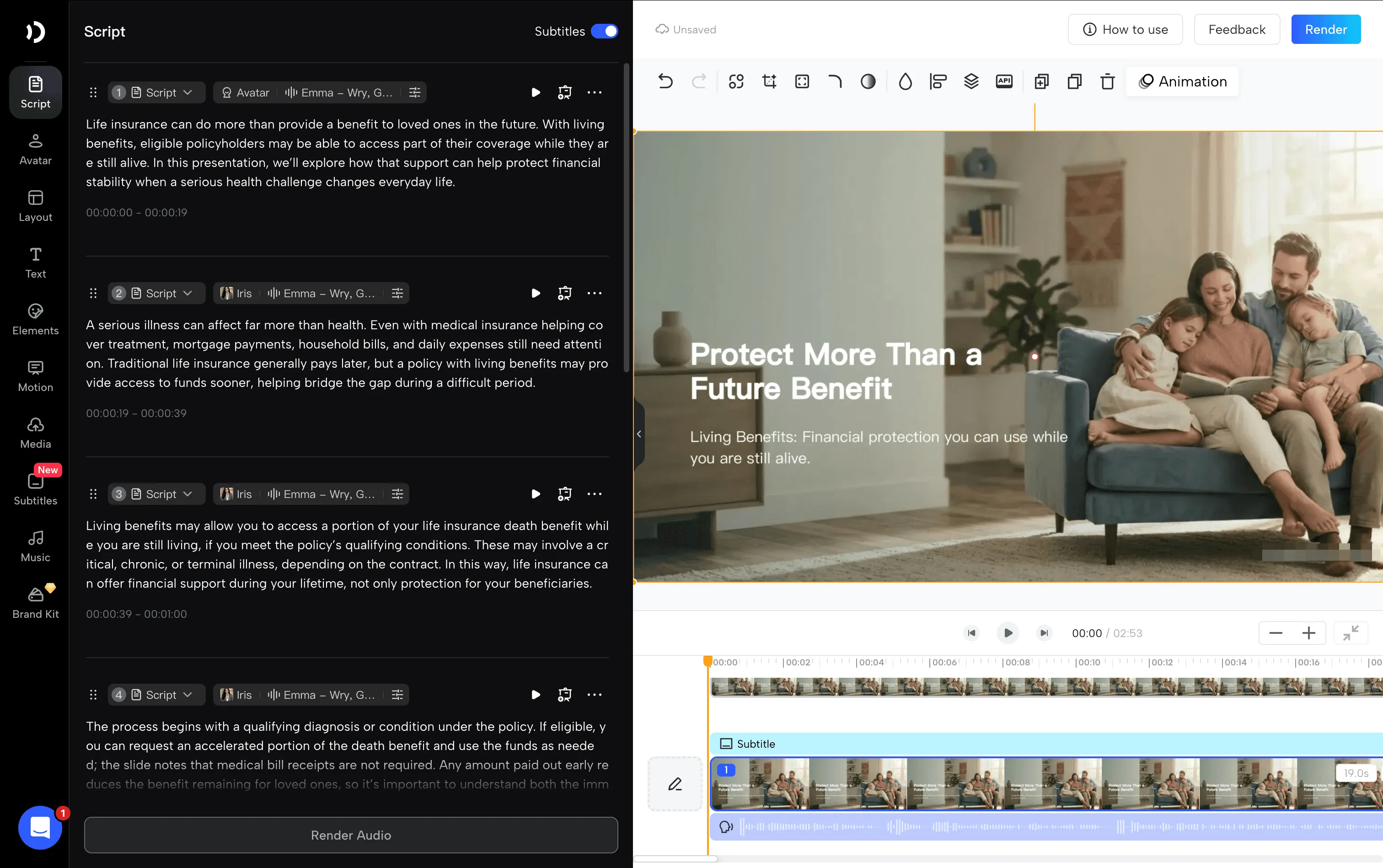
Living benefits should be explained carefully. Certain life insurance policies or riders may allow qualifying policyholders to receive part of the death benefit during their lifetime, subject to contractual conditions.
An accelerated benefit payment may reduce the death benefit remaining for beneficiaries.
For more information about these provisions, refer to the NAIC’s insurance regulatory resources.
Step 2: Upload Your PowerPoint
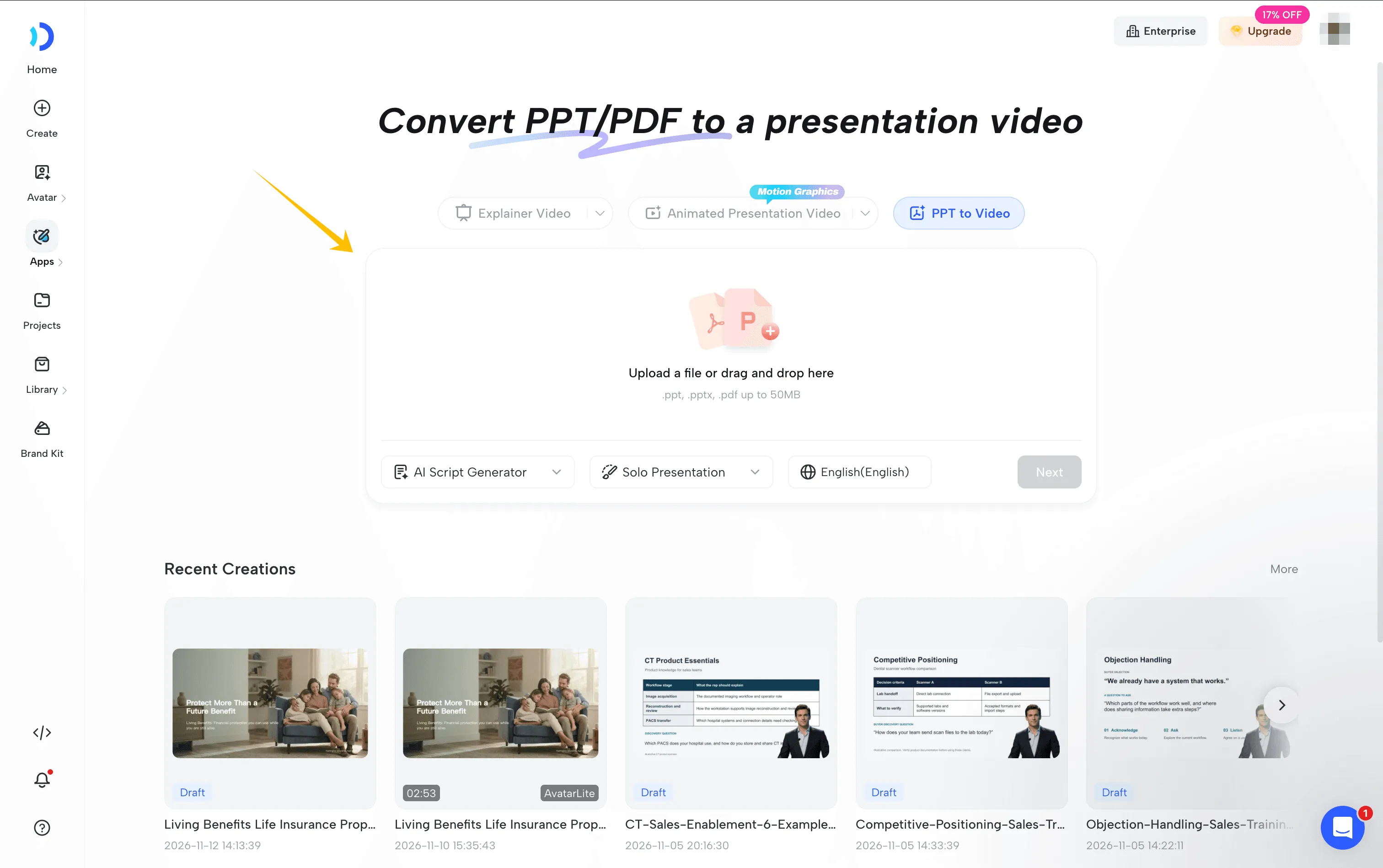
Open JoggAI’s PPT to Video tool.
Upload your presentation in PPT, PPTX, or PDF format.
JoggAI can use the slide content to create a narrated presentation video.
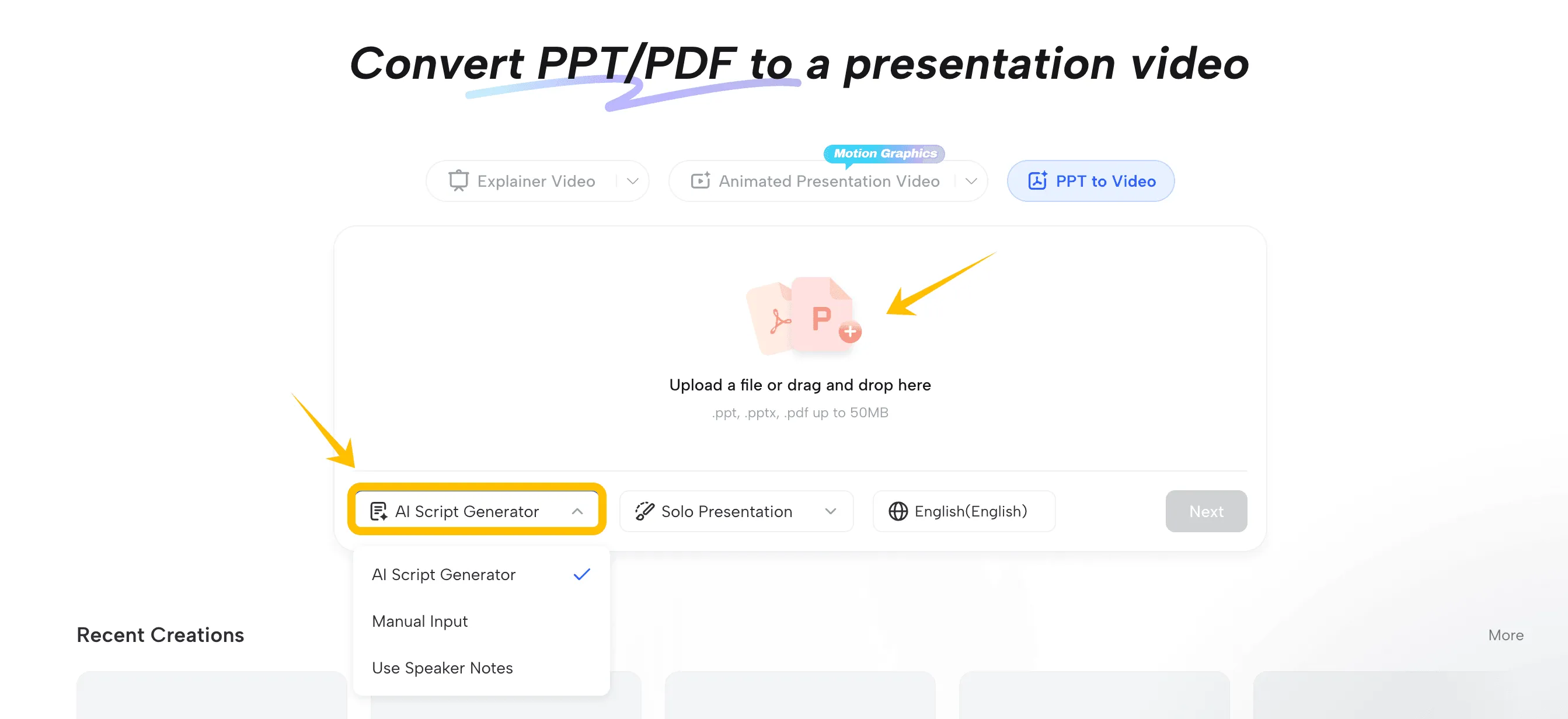
If your PowerPoint already contains speaker notes, those notes may also provide a useful starting point for narration.
Step 3: Choose Your Narration Settings
Depending on your materials, you can choose among available narration approaches, including generating a script from the slides, using speaker notes, or entering narration manually.
For insurance training, approved speaker notes may be especially valuable because they can preserve important policy terminology and required disclosures.
Choose the presentation format and language that fit your training audience.
Step 4: Add an AI Presenter
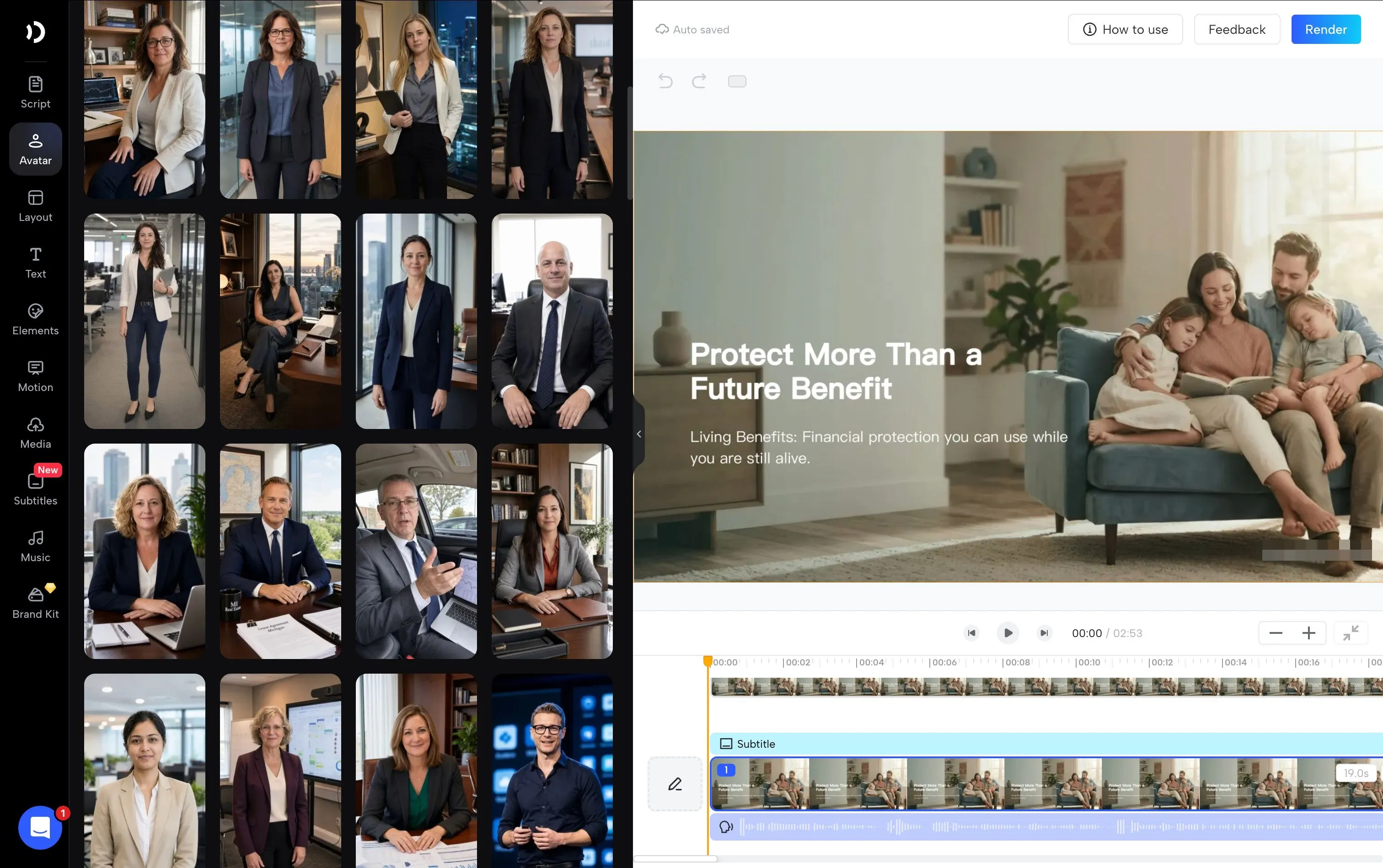
Select an AI presenter and narration voice.
The presenter can guide viewers through the slide content, making the finished video resemble a recorded training session.
For example, an AI instructor could introduce living benefits, walk through eligibility considerations, and explain the questions insurance agents should address before discussing a particular policy.
Keep the slides readable and avoid placing the presenter over important policy details.
Step 5: Generate and Share the Training Video
Generate the video and review the final presentation.
Check that the narration accurately represents the slides and that no important qualifying conditions or disclosures have been omitted.
Once approved, the video can become part of your insurance agency’s onboarding or internal training resources.
When a product or process changes, update the source presentation and create a revised training video.
This makes PPT to Video a useful option for agencies that regularly maintain training materials.
Frequently Asked Questions
What is the best AI video generator for insurance explainer videos?
The best tool depends on the type of video you want to create. JoggAI offers Explainer Video, Animated Presentation, and PPT to Video workflows, allowing insurance professionals to choose a format based on their content.
Can AI create an insurance explainer video from a PDF?
Yes. AI video tools such as JoggAI can use uploaded documents as reference materials when developing certain explainer videos and animated presentations.
However, the generated script should be checked against the original document, especially when it includes policy exclusions, eligibility conditions, or other contractual details.
Can I turn an insurance PowerPoint into a video?
Yes. With JoggAI’s PPT to Video tool, you can upload a PowerPoint presentation and create a narrated video using the slide content or available speaker notes. You can also add an AI presenter to help deliver the information.
Do I need to record myself to make an insurance explainer video?
Not necessarily. Animated explainer videos can use AI-generated visuals and narration without a person appearing on camera. If you prefer a human-style presentation, you can use an available AI presenter or authorized custom avatar.
How long should an insurance explainer video be?
It depends on the topic and audience. A short video answering one customer question may need only 30–90 seconds, while a detailed product comparison or insurance training lesson may require several minutes. Prioritize clarity and completeness over a fixed duration.
Can insurance agencies create multilingual explainer videos?
Yes. JoggAI supports multilingual video creation across relevant workflows. Insurance agencies can use this capability to create educational content for audiences who prefer different languages.
However, translated policy descriptions should be reviewed carefully, since insurance terms may have specific meanings and disclosure requirements.
Are AI-generated insurance explainer videos accurate?
AI can help organize information and create narration, but it can still produce errors, omit conditions, or oversimplify policy provisions.
Insurance agents and agencies should review every video against approved source materials before publishing or sharing it with customers.
Create Insurance Explainer Videos with JoggAI
Creating an insurance explainer video doesn’t have to involve complicated editing software or repeated filming.
With JoggAI, insurance agents and agencies can choose a workflow that fits the information they want to share.
Use Explainer Video to turn insurance concepts into short animated explanations. Choose Animated Presentationwhen you need AI presenters, comparisons, charts, and structured visuals. Or use PPT to Video to transform existing insurance product presentations and training materials into narrated videos.
Whether you’re explaining homeowners insurance, introducing living benefits, answering common policy questions, or training new agents, the right video format can help you present information more clearly.
Start with accurate source materials, choose the format that suits your audience, and review the final content before publishing.