
Want to create a funny reaction GIF, a seamless loop, or an eye-catching animation for social media? You don’t need animation skills or complicated editing software anymore.
With JoggAI’s AI GIF Generator, you can create animated GIFs by simply describing what you want to see. Whether it’s a surprised reaction, a dancing animal, or a promotional product animation, AI helps turn your ideas into moving visuals.
In this guide, you’ll learn how to make animated GIFs for free, explore five creative examples, and get ready-to-use prompts to try with JoggAI.
How to Make an Animated GIF with JoggAI
Making an animated GIF doesn’t have to involve editing video clips or creating individual animation frames. With JoggAI, you can go from an idea to an animation in three simple steps.
Step 1: Describe Your GIF
Start by opening JoggAI’s AI GIF Generator.
Enter a text prompt describing the animation you want to create. For the best results, include the subject, its movement, and your preferred visual style.
For example:
A cheerful golden retriever wearing sunglasses dances from side to side. The dog gently waves its paws and wags its tail. Bright 3D cartoon style, clean blue background, smooth seamless loop, fixed camera.
You can create anything from realistic human expressions to playful cartoon characters and product animations.
Step 2: Generate with AI
Click Generate and let JoggAI bring your idea to life.
Instead of manually designing every frame, you can use your prompt to guide the AI’s interpretation of the animation.
For a smoother result, keep your first attempt simple. A single repeating action, such as blinking, waving, or gently bouncing, often works well for short GIFs.
Step 3: Preview and Download
Preview your generated animation and see whether the movement matches your idea.
Pay attention to the motion, subject consistency, and how naturally the animation repeats.
If you want a different expression, movement, or visual style, adjust your prompt and try again.
When you’re happy with the result, download your GIF and share it.
5 Animated GIF Ideas You Can Generate with AI
Need some inspiration? Here are five popular animated GIF styles you can experiment with.
Each example includes a ready-to-use prompt. Copy one, customize it, and try generating your own version with JoggAI.
1. Reaction GIFs: Express Yourself Without Words

Sometimes a single expression says more than a sentence.
Reaction GIFs are widely used in online conversations, social media comments, and group chats to communicate emotions such as excitement, disbelief, embarrassment, or surprise.
With AI, you can create a reaction around a specific emotion instead of searching through existing GIF libraries.
Copy this prompt:
Create a looping reaction GIF of a surprised young man. His eyes widen, his eyebrows rise, and he slowly covers his mouth in disbelief. Realistic facial expressions, soft studio lighting, simple background, fixed camera. Make the movement smooth and natural.
Try customizing it: Replace “surprised” with excited, confused, embarrassed, or frustrated to experiment with different reactions.
2. Seamless Loop GIFs: Create Animations That Never Stop

A seamless loop is an animation designed to repeat without an obvious jump between the last and first frames.
These GIFs are useful for website visuals, social posts, relaxing animations, and creative digital projects.
Simple movements like rising steam, falling rain, drifting clouds, or gently swaying leaves can work especially well.
Copy this prompt:
Create a seamless looping GIF of a white ceramic coffee cup resting on a wooden table beside a sunny window. Thin steam gently rises from the coffee and curls into the air. Warm natural lighting, realistic photography style, fixed camera. Keep the cup and background stationary, with the final frame transitioning smoothly into the first.
Try customizing it: Replace the coffee steam with candlelight, ocean waves, falling snow, or a rotating planet.
3. Meme GIFs: Turn Everyday Moments into Funny Animations
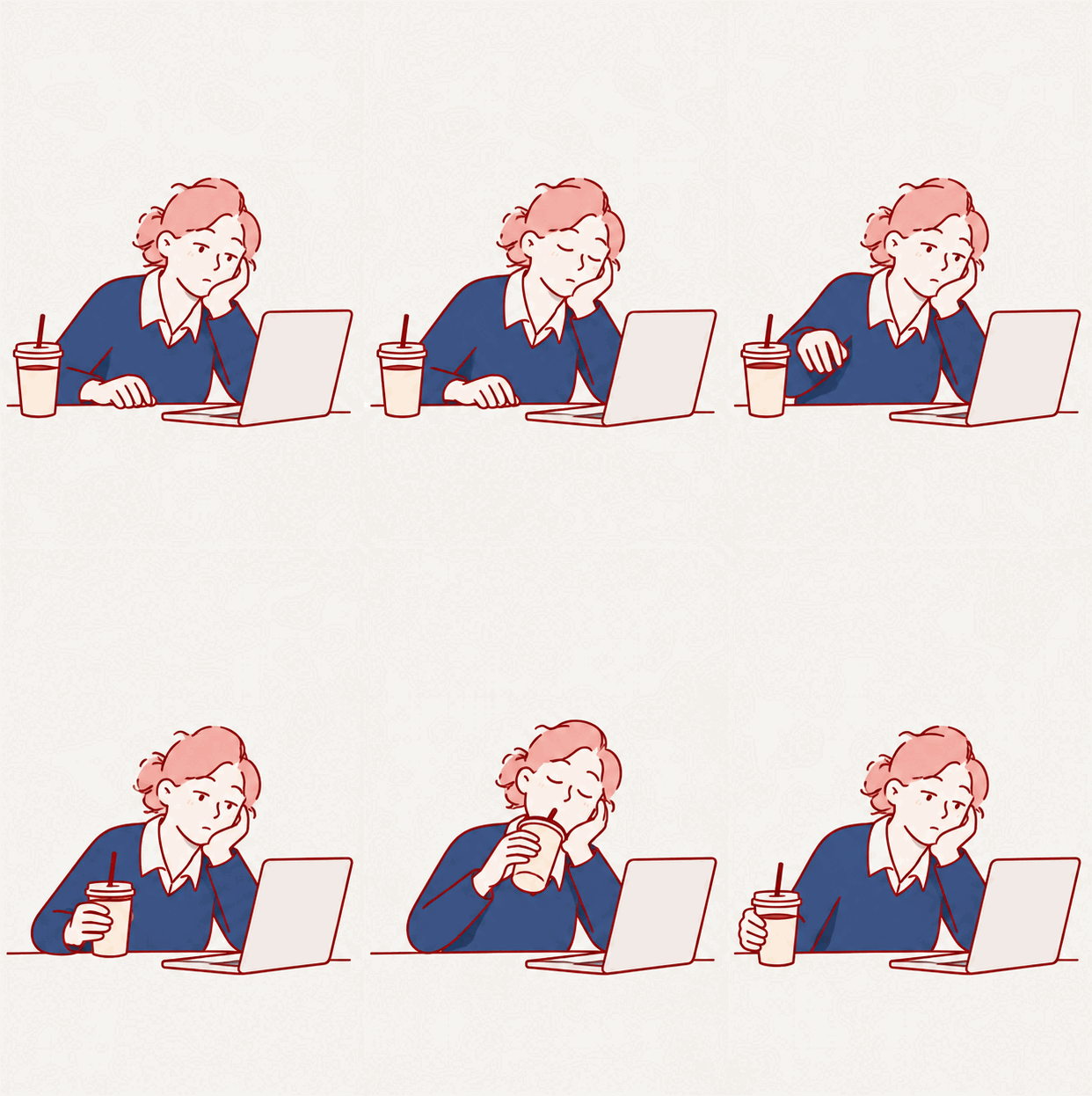
Memes are all about relatable moments.
Whether it’s struggling to wake up on Monday, waiting for an email reply, or reacting to an unexpected meeting, a short animated GIF can capture the joke instantly.
AI makes it easier to experiment with original situations, characters, and expressions.
Copy this prompt:
Create a funny looping GIF of an exhausted office worker sitting in front of a laptop on Monday morning. The character slowly blinks, reaches for a cup of coffee, takes a tired sip, and returns to staring at the screen. Playful modern cartoon illustration, minimal office background, smooth repeating motion.
Try customizing it: Change the situation to “waiting for Friday,” “another meeting that could have been an email,” or “when the Wi-Fi stops working.”
4. Marketing GIFs: Make Product Visuals More Engaging

Animated GIFs aren’t just for entertainment. They can also be useful for product marketing and digital campaigns.
A subtle animation can draw attention to a product, highlight its appearance, or add visual interest to a promotional email.
For product-focused GIFs, you don’t always need dramatic movement. Gentle lighting changes, small ripples, and rotating objects can create polished effects.
Copy this prompt:
Create a premium looping product animation featuring a minimalist white skincare serum bottle on a light blue studio background. Gentle water ripples expand around the bottle while soft reflections move across its surface. Elegant commercial product photography, fixed camera, consistent bottle shape and packaging, smooth subtle motion.
Try customizing it: Replace the serum bottle with a perfume, sneaker, beverage can, or cosmetic product.
For real branded products, check the generated packaging and labels carefully before publishing.
5. Funny Animal GIFs: Create Cute, Shareable Characters
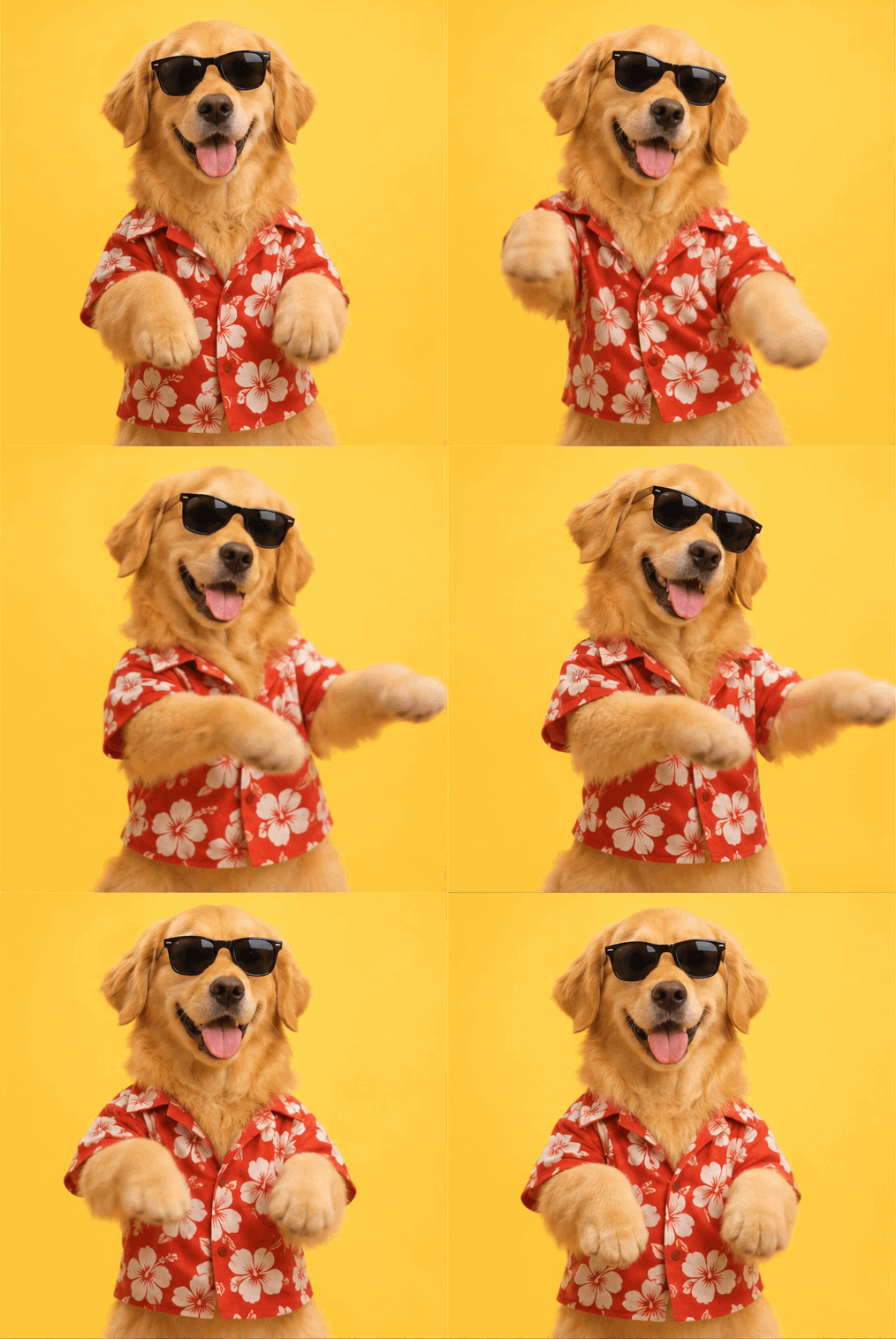
Cute animals are a natural fit for short animated GIFs.
A dancing dog, waving cat, or bouncing cartoon rabbit can work as a reaction, digital greeting, or playful social media post.
You can explore different styles, including photorealistic animals, 3D cartoons, pixel art, and hand-drawn illustrations.
Copy this prompt:
Create a fun seamless looping GIF of a happy golden retriever wearing black sunglasses and a bright blue hoodie. The dog playfully dances from side to side, alternately raising its front paws while wagging its tail. Colorful 3D cartoon style, clean pastel-blue studio background, consistent character design, fixed camera, smooth repeating motion.
Try customizing it: Swap the golden retriever for a dancing penguin, waving orange cat, or bouncing corgi.
How to Write Better AI Animated GIF Prompts
You don’t have to be a prompt engineer to create a good GIF. But including a few specific details can make a big difference.
A useful AI GIF prompt generally follows this structure:
Subject + Action + Visual Style + Background + Loop Instructions
For example:
A cute orange cat [subject] slowly waves one paw [action], in a soft 3D cartoon style [visual style], against a simple cream background [background]. Fixed camera, consistent appearance, seamless looping motion [loop instructions].
Here are four practical tips to improve your results.
Keep the Action Simple
A GIF usually works best when it focuses on one clear movement.
For example, “a character blinking and smiling” is easier to follow than an animation where the character jumps, dances, changes clothes, and moves through several scenes.
Describe the Loop Clearly
If you want the animation to repeat continuously, include phrases such as:
-
Seamless loop
-
Smooth repeating motion
-
Fixed camera
-
Return naturally to the starting pose
-
Match the final frame to the first frame
These instructions help communicate the type of motion you’re looking for, although the final result may still require refinement.
Maintain a Consistent Subject
For character animations, describe important visual details such as clothing, hair, colors, and facial features.
For product GIFs, ask AI to keep the packaging, shape, and background consistent throughout the animation.
Experiment with Different Styles
The same action can look completely different depending on the style you choose.
Try realistic photography for human reactions, 3D cartoons for playful characters, or minimalist illustrations for clean website animations.
If you need more inspiration, explore our 90 Free ChatGPT GIF Prompts for additional ideas you can customize.
Why Use AI to Make Animated GIFs?
Traditional GIF creation often starts with existing footage, a sequence of images, or manual animation software.
AI introduces a different workflow: you can begin with a written idea.
That makes AI GIF generation especially useful when you want to:
-
Create something original: Describe a scene that doesn’t already exist in a GIF library.
-
Explore different styles: Experiment with realistic, cartoon, or illustrated animations.
-
Customize expressions: Create reactions and movements for specific situations.
-
Develop marketing concepts: Turn product and campaign ideas into animated visuals.
-
Save manual editing steps: Start with text rather than constructing every animation frame yourself.
With JoggAI, you can move from an idea to a generated animation without building it frame by frame.
Frequently Asked Questions About Animated GIFs
How can I make an animated GIF for free?
You can use an online GIF maker to animate existing images or convert video clips. Alternatively, you can use an AI GIF generator such as JoggAI to create an animation from a text prompt. Free access and generation limits depend on the available plan and credits.
Can AI generate an animated GIF from text?
Yes. Text-to-GIF generation lets you describe a subject, movement, and visual style. The AI then generates an animation based on your description.
How do I make a GIF loop smoothly?
Describe a repeating action and request a seamless loop. Keeping the camera fixed and making the ending pose match the starting pose can improve continuity.
What are the best prompts for animated GIFs?
Effective prompts clearly describe the subject, main action, animation style, background, and looping behavior. Simple actions such as waving, blinking, or bouncing are good starting points.
Can I use AI-generated GIFs for social media?
Yes. Animated GIFs can be useful for reactions, memes, decorative visuals, and social posts, provided the platform supports the format. Check each platform’s upload requirements, since some services convert GIFs into video for playback.
Can I use animated GIFs for marketing?
Animated GIFs can be useful for emails, product visuals, and digital campaigns. Before commercial use, review the applicable tool terms and ensure you have the necessary rights to any uploaded or referenced content.
Start Creating Animated GIFs with JoggAI
From funny reactions and seamless loops to product animations and playful characters, animated GIFs offer endless opportunities for creative expression.
And you don’t need to build them frame by frame.
With JoggAI, you can describe your idea, generate an animation with AI, and explore different creative directions.
Pick a prompt from this guide, customize it, and see what you can create.