
A sales enablement platform for complex B2B products should help teams turn technical knowledge into resources that reps and buyers can use. That includes training, workflow explanations, and content for different buyer roles. JoggAI supports the video creation side of that work: turning existing product materials into narrated training and buyer-facing videos without recording a presenter for every version.
Consider a CT imaging system. A rep needs to learn how to introduce it. A radiographer wants to see the imaging workflow, while an imaging department manager needs to understand staff training. This guide shows how one set of approved product materials can support those conversations through six JoggAI video workflows, with generation costs calculated from published credit rates. The device is a hypothetical example, not a customer case.
Where Video Helps Explain a Complex Product
A feature list tells people what a product includes. A narrated explanation can connect those features to a task: what the user does, what they see, and what they need to check next.
For example, a product expert can approve a script explaining how CT images move from acquisition to reconstruction and hospital image storage. JoggAI can present that explanation alongside real device footage and software screenshots. Reps can revisit the lesson, and buyers can share an appropriate version with colleagues who missed the demonstration.
Effective sales enablement for complex B2B products starts with reusing that expertise. The expert checks the explanation while the content team prepares the video and its variants. Live conversations remain available for questions and technical validation.
What to Prepare Before Creating Videos with JoggAI
Choose one product task to explain and collect the materials needed to show it accurately. For the CT system example, start with:
-
A current product training deck and its speaker notes.
-
Approved device images, operation footage, and software screenshots.
-
The documented workflow and relevant compatibility information.
-
A short list of recurring rep and buyer questions.
Use JoggAI’s PPT to Video when the explanation already follows a finished deck. It retains slide order, visual structure, and supported animations, and can use speaker notes for narration.
Use AI Presentation Maker when the source is a document, PDF, webpage, or a collection of materials that needs organizing into scenes. Review the generated outline, narration, and storyboard before rendering.
Choose a stock presenter or an authorized custom avatar of your product expert. For an ongoing training series, a familiar presenter can appear across lessons while the team updates the scripts.
6 Ways to Use JoggAI for Complex Product Sales Enablement
1. Turn a Technical Product Deck into Rep Training
Start with the explanation reps need before they speak to buyers. Upload the approved product deck to PPT to Video and build a short module around one task.
For the CT system, a three minutes lesson could cover who uses it, the documented imaging workflow, and what a rep should ask before arranging a tailored demonstration. Keep detailed specifications in the supporting material, and use the video to teach the sequence and conversation.
In JoggAI: Retain the deck’s sequence, add an AI presenter and narration, then preview the slides for formatting and timing. If you use a custom avatar, the expert participates in its initial creation and authorizes their likeness.
Example lesson line: “Before recommending a configuration, ask which PACS the hospital uses and how it currently stores and shares CT images.” PACS is the hospital’s picture archiving and communication system.
Production work reduced: Repeated expert recordings, retakes, and some of the editing needed to turn slides into narrated lessons. The expert still reviews the technical explanation.
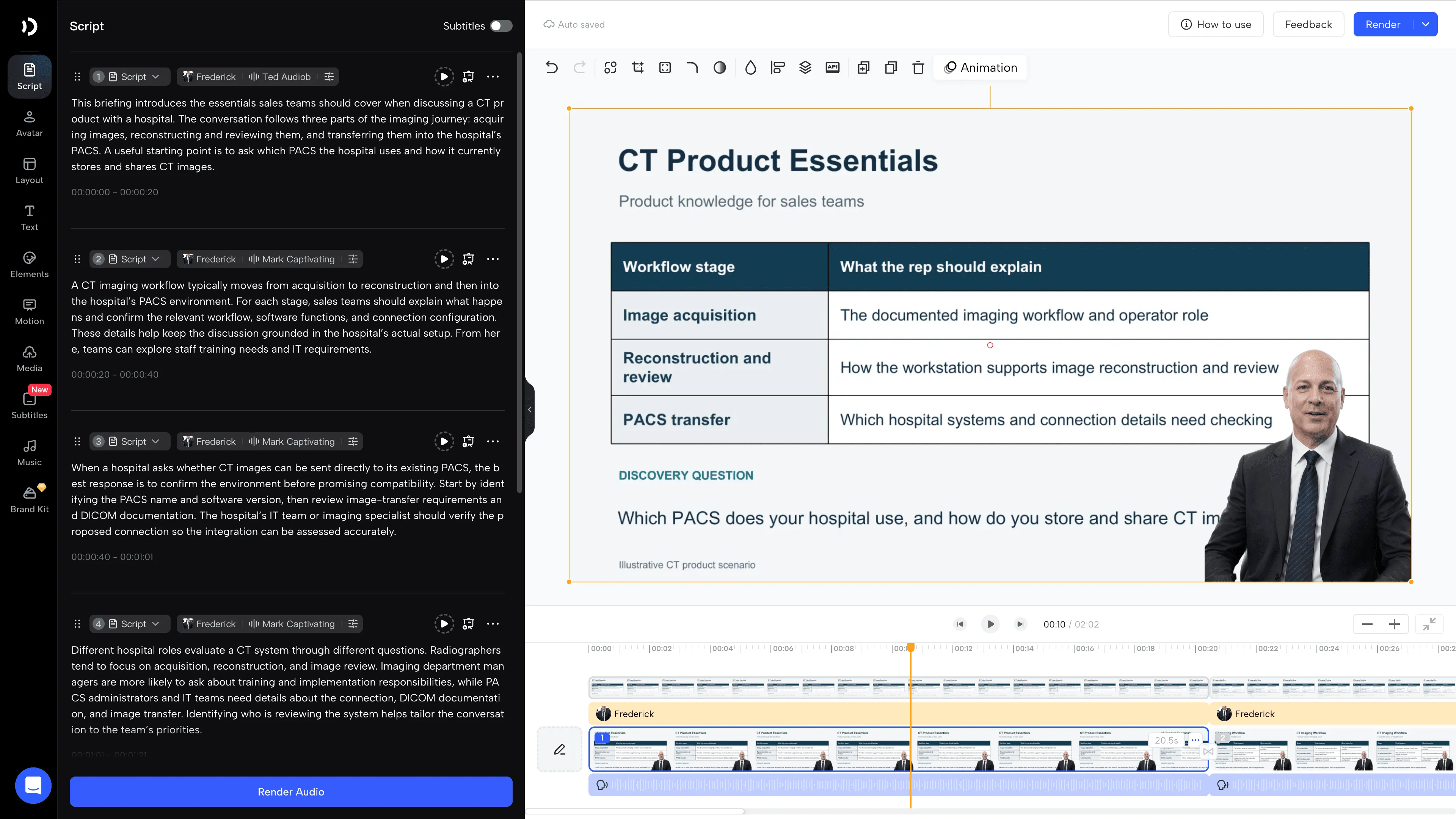
A three-minute PPT video uses 300 credits.
2. Build a Buyer-Facing Workflow Explainer
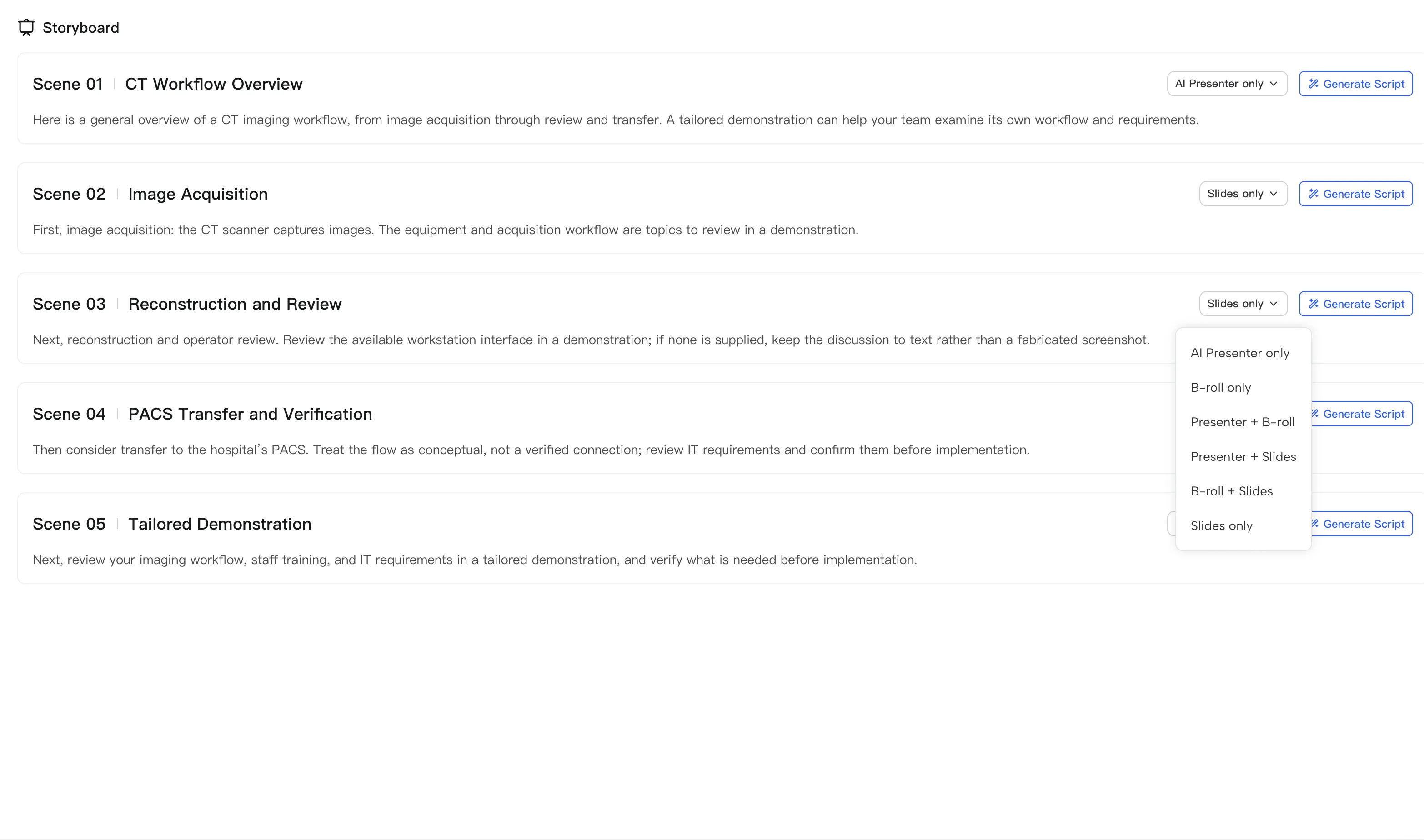
Create a separate video that lets a buyer see how the product fits into a task. For the CT system, show image acquisition, reconstruction and review, and the proposed transfer to the hospital’s PACS.
In JoggAI: Use Animated Presentation to organize the approved source into scenes. Combine the AI presenter with supplied device footage, software images, and process graphics. Review what the narrator says at each step and whether the image actually supports it.
A simple two minutes storyboard might include a brief introduction, the equipment footage, an image-reconstruction screen, and a final scene listing what to confirm during the buyer’s evaluation.
Production work reduced: Repeated presenter shoots and some manual scene assembly. The video can be reused for buyers evaluating the same documented workflow.
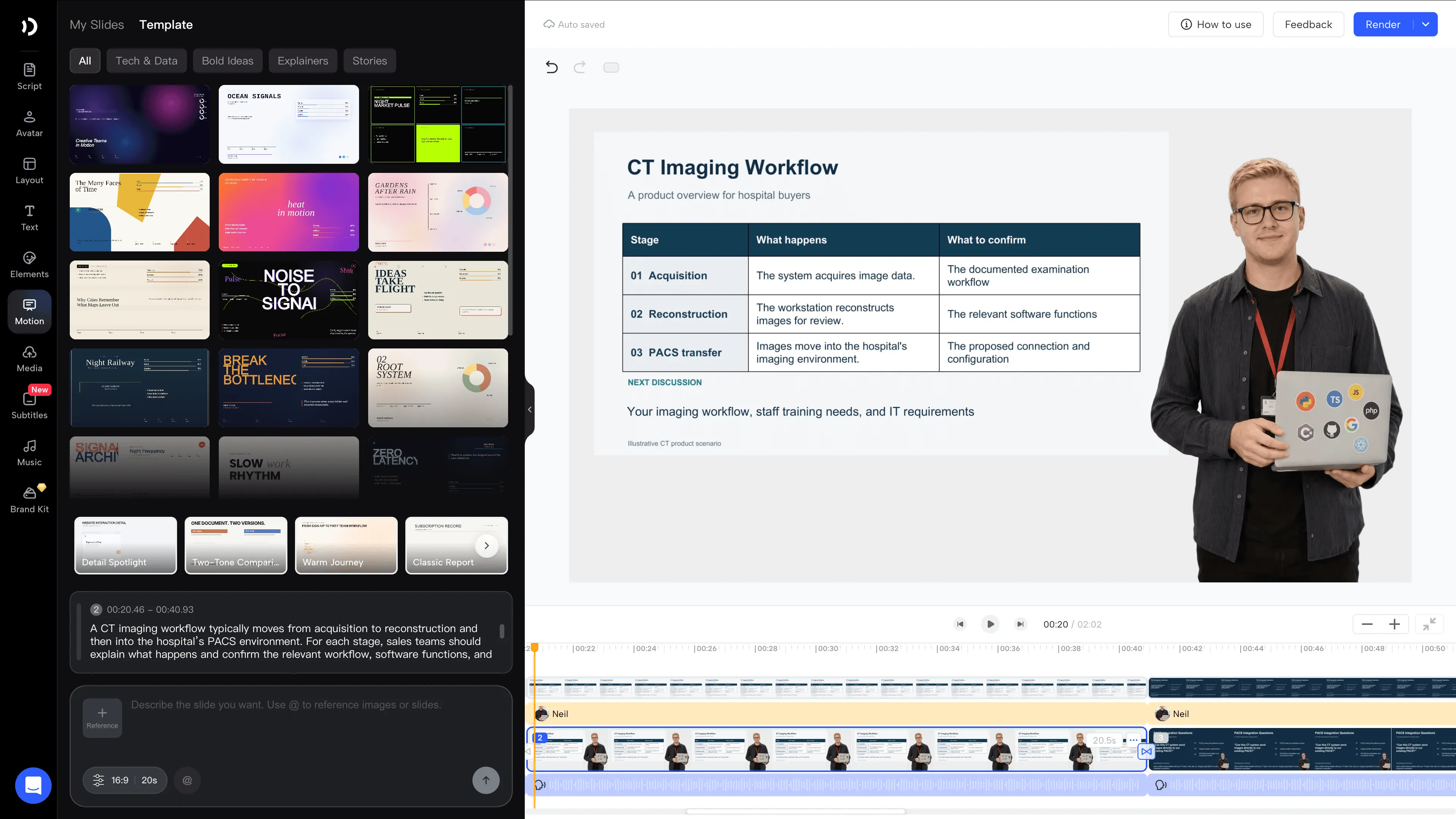
The two-minute final render uses 200 credits.
3. Record a Model Answer to a Technical Objection
A complex product sale can stall when a rep cannot answer a configuration question. Create a short internal teaching video that shows how to respond and what to confirm.
For example, a buyer asks, “Can this CT system send images directly to our existing PACS?” The lesson should show the rep how to gather the PACS name, software version, and transfer requirements. The specialist can then review the device’s DICOM conformance statement and proposed configuration. DICOM is the standard used to exchange medical images; support for it still requires checking the specific connection.
In JoggAI: Put the buyer’s question on screen and use an Avatar presenter to demonstrate the response. Avatar supports natural expressions and several face angles. An authorized custom avatar can keep the same product specialist visible across the series.
Example response: “Let’s confirm your PACS name, version, and image-transfer requirements. Our imaging specialist can then review the DICOM documentation and proposed connection with your IT team.”
Production work reduced: Filming the expert for every short answer and arranging retakes when the wording changes. Reps get a consistent example to study before manager-led practice.
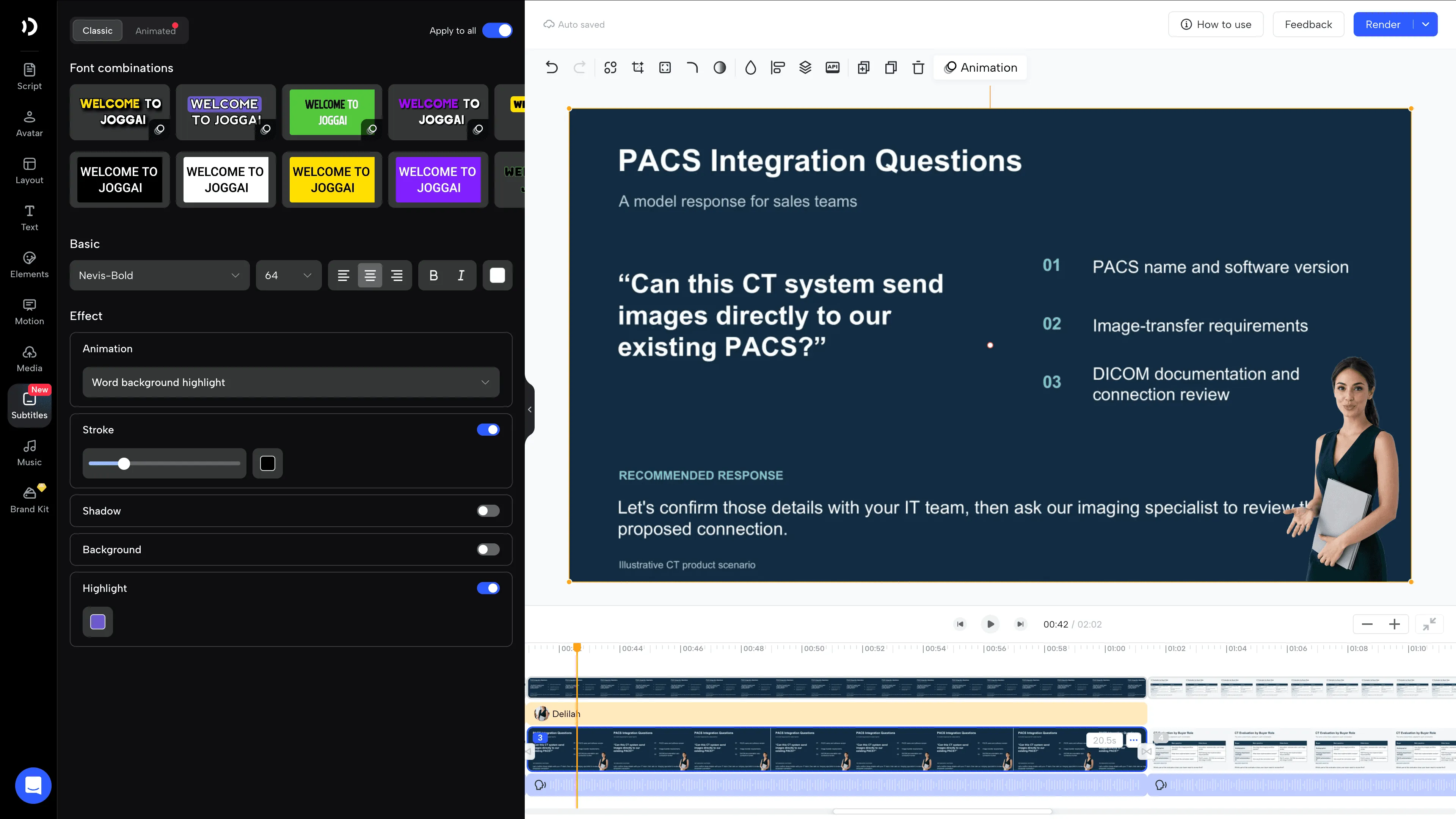
An Avatar video up to one minute costs 200 credits.
4. Adapt the Explanation for Different Buyer Roles
Keep the product facts consistent while changing which question the video answers. The same CT system source material can support a radiographer workflow overview, a department training plan, and a PACS integration discussion.
In JoggAI: Reuse the relevant approved visuals and presenter, edit the script and scenes for each audience, and generate separate outputs. When using team templates, choose a plan that includes them.
| Buyer | Video focus | Example opening |
|---|---|---|
| Radiographer | Documented acquisition, reconstruction, and review workflow | “Here is the imaging workflow we’ll walk through in the demonstration.” |
| Imaging department manager | Staff training and implementation responsibilities | “Let’s review which team members need training and what implementation involves.” |
| PACS administrator or hospital IT reviewer | DICOM documentation, software versions, and image transfer | “We’ll start by confirming your PACS and image-transfer requirements.” |
Production work reduced: Re-recording a presenter to explain each audience’s version. Reusing source material also reduces the work of assembling each explanation from scratch.
For a budget example, three 45-second standard Avatar Videos use 75 credits each, or 225 credits total.
5. Prepare Language Versions for Regional Teams and Buyers
An approved source video can support several markets without arranging separate presenter sessions in every language.
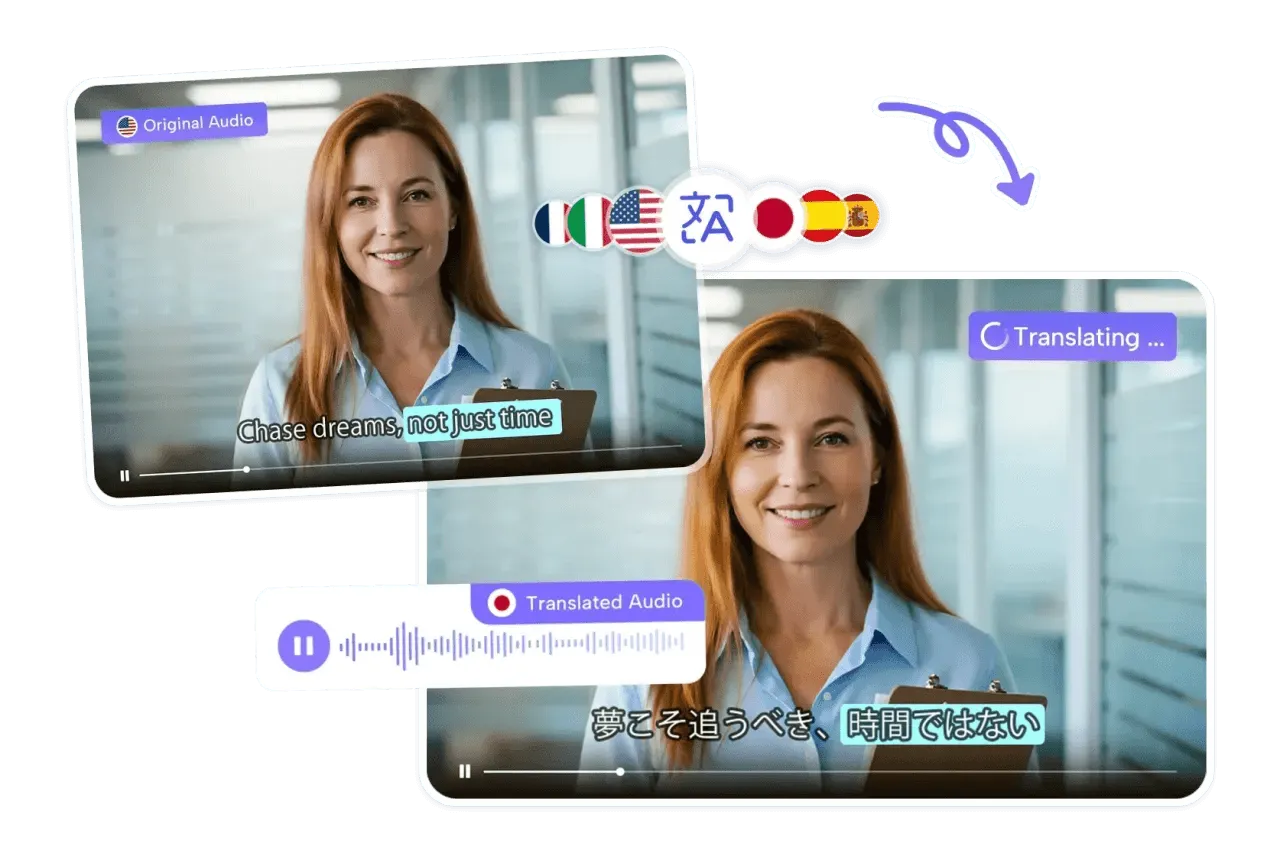
In JoggAI: Use Video Translator to localize an existing video with voice cloning and lip-sync. It supports 90+ languages. Avatar and presentation creation workflows separately support 50+ languages.
For the CT system overview, start with a two minutes approved English source. Prepare three target-language versions, then ask local reviewers to check product terminology, units, narration, captions, and any regional differences in availability.
Production work reduced: Separate voice or presenter recordings and some synchronization work for each language. Local review remains necessary, particularly when product names or technical terms need a specific pronunciation.
At 25 credits per 15 seconds per target language, a two-minute video translated into three languages uses 600 credits.
6. Update Changed Product Explanations in the Editable Project
A new software screen or revised compatibility condition should prompt a content update. Keep the source project so the team can find the relevant scene and revise it.
In JoggAI: Open the Animated Presentation project, change the affected script and visuals, review the result, and regenerate the relevant scene. Check whether the final output and any localized versions also require new rendering.
For example, a CT software update changes the reconstruction screen. Replace the old screenshot, revise the explanation if needed, and have the product expert approve the new wording before publishing.
Production work reduced: Scheduling a new presenter shoot and rebuilding unchanged material. The benefit depends on the project’s structure and which generation steps must run again.
What Would This Complex Product Video Pack Cost?
If the full credit balance is used, each credit carries an allocated value of $29 ÷ 12,000, or approximately $0.00242. Duration-based charges round up to the next complete billing interval. These examples use the published Web rates; selected models, settings, and API usage may differ.
| Asset | Workflow and duration | Credits | Allocated generation cost |
|---|---|---|---|
| Internal technical lesson | PPT to Video, 3 minutes | 300 | $0.73 |
| Buyer workflow overview | Animated Presentation final render, 2 minutes | 200 | $0.48 |
| Compatibility-answer lesson | AvatarX, 45 seconds | 200 | $0.48 |
| Three buyer-role explanations | Standard Avatar Video, 45 seconds each | 225 | $0.54 |
| Three language versions of the overview | Translation, 2 minutes per target language | 600 | $1.45 |
To calculate actual savings, compare the same deliverables and include script preparation, expert review, recording, editing, localization checks, and software costs in both workflows. JoggAI can reduce repeated recording work; the number of dollars saved depends on your team’s baseline and final production effort.
What to Look for in a Sales Enablement Platform
When evaluating a sales enablement platform for complex B2B products, consider how videos will be created, delivered, and kept current. JoggAI handles the creation workflow described here. Your LMS can manage learning assignments and assessments, while your CRM holds contact and deal history.
Choose the platform around the work your team needs to improve:
-
Create explanations: Test technical-deck imports, terminology, product visuals, and language versions.
-
Deliver training and content: Check how reps access current materials and how learning assignments are managed.
-
Keep materials current: Check ownership, review steps, version control, and connections to your existing systems.
For the JoggAI production pilot, test one real deck and one buyer explanation. Check the slide layout, technical pronunciation, presenter style, and effort needed to approve the output. If several people need to create content, also check the plan’s seats, templates, and collaboration features.
Success starts with an approved video that a rep or buyer can use. Compare the effort per finished asset, then assess whether the explanation helps the audience answer its intended question.
FAQs
Can JoggAI Work from Existing Technical Product Materials?
Yes. Use PPT to Video for a finished presentation, or AI Presentation Maker to organize supported source materials into narrated scenes. Have a product expert review the script, visuals, and terminology.
Can an AI Presenter Explain Our Actual Equipment?
The presenter can narrate an approved script alongside supplied product images and footage. Use real recordings for actual equipment operation and documented evidence for performance claims.
Can We Reuse Our Product Expert’s Image and Voice?
An authorized custom avatar and voice clone can support future presenter-led videos.
Should Every Buyer Receive the Same Video?
Match the explanation to the buyer’s question. Reuse accurate product facts and visuals, then adapt the script for the role and agreed next step. A technical evaluation still needs the relevant documents and specialist discussion.
Create Complex Product Videos with JoggAI
Choose one product workflow your team explains repeatedly. Bring the approved deck and real product visuals, then create an internal lesson and a buyer-facing overview. Reuse those sources for role-specific explanations, language versions, and future updates.
Explore JoggAI’s sales enablement capabilities to learn more. For higher-volume or enterprise needs, book a demo to discuss your requirements with our sales team.